Presence
Join the pilot
Now in a small pilot on Android

Your hours, written for you.

You arrive, you work, you head home. Presence keeps track of when – no timer, no location history, no peeking at your screen.
Join the pilot See how it works
  • No account
  • Works offline
  • Your days stay on your phone
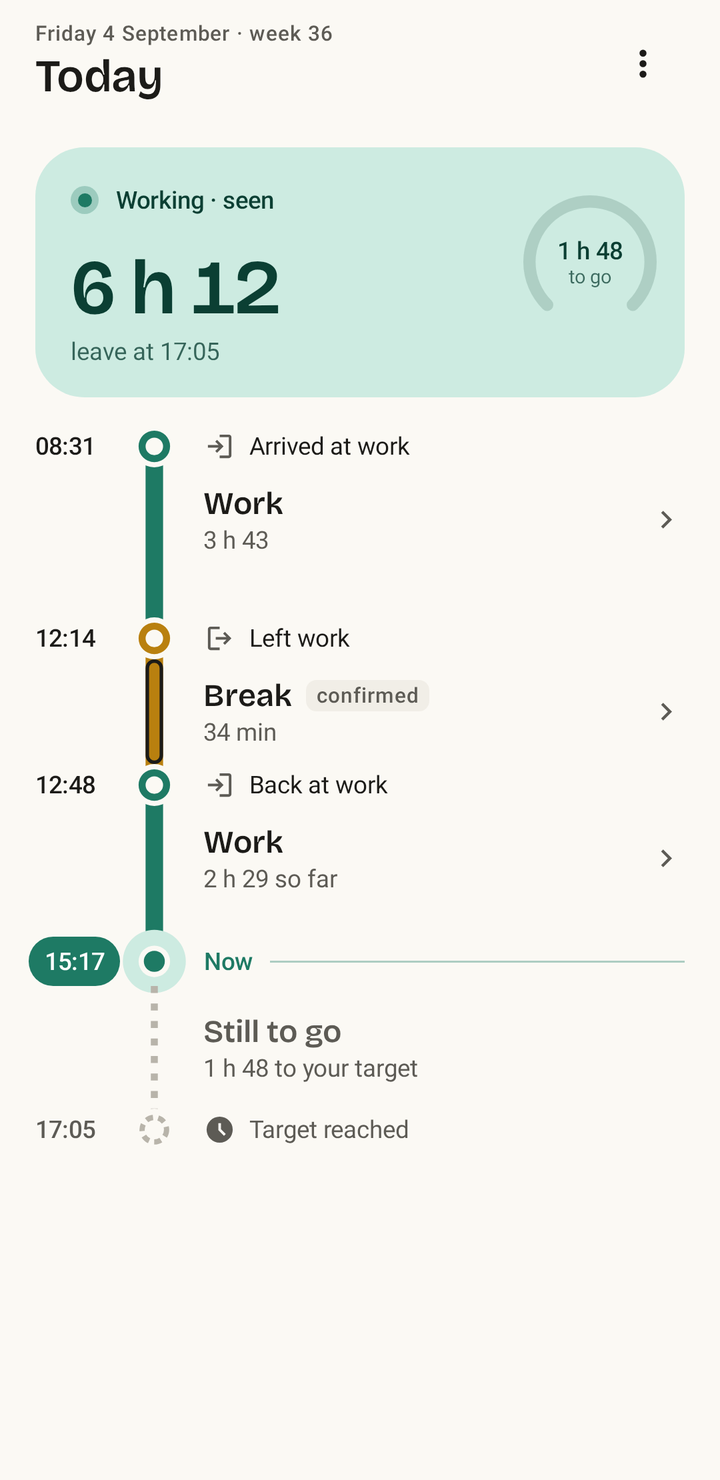
Presence Today screen: Working, 6 h 12 worked, leave at 17:05, with a timeline of work from 08:31, a 34 minute break from 12:14 and work since 12:48
Why work from 08:31?
Arrived at work Walked in, then stayed put Stayed until 12:14
Not a timer

Your day, the way it really went.

No clock to start, nothing to forget. Presence collects small clues through the day and puts them together, the way you would if you had to remember.

What the phone noticed
  • 08:31 Close to work
  • 08:33 Walked in, then stayed put
  • 12:14 Away from work
  • 12:48 Close to work again
  • You answered one question: Break
  • Your target: 8 h a day
What the phone noticed
Your day in Presence
08:31 Close to work
08:31 Arrived at work
08:33 Walked in, then stayed put
Work3 h 43
12:14 Away from work
12:14 Left work
You answered one question: Break
Breakconfirmed34 min
12:48 Close to work again
12:48 Back at work
Work2 h 29 so far
15:17 Now
Your target: 8 h a day
Still to go1 h 48 to your target
17:05 Target reached
1
Your phone noticesYou reach one of your places, you walk, you sit still. Your phone notices this anyway and tells Presence.
2
CluesNo single clue decides. Being somewhere isn't working, and stepping out isn't a break.
3
Your dayWork, breaks and travel, plus how long is left. Unsure? Presence asks one short question.
What we're aiming for

The time tracker you never have to touch.

Most days you do nothing at all. When Presence isn't sure, it asks one quick question instead of guessing, and remembers your answer for next time.

Mon 0 taps
Tue 0 taps
Wed 0 taps
Thu 1 answer
Fri 0 taps
Thursday, 17:52Did you finish at about 17:40? YesChoose end
Made for hybrid work

At the office, at home or on the road.

At work: walk in, and the day starts

Pin where you work once. After that, walking in, heading out to lunch and leaving become your start, your break and your end. No taps.

08:31Lunch 34 min17:05

At home: being home isn't working

Tap Start work, or let an optional desk beacon notice when you sit down. Once Presence knows your usual break, it adds it for you.

Start work 08:12Usual breakDone 16:36

On the road: the drive counts

The drive to a customer is work, not a break. And a long day that runs past midnight stays on the day it started, just like on your timesheet.

Travel 07:40At the customerHome 18:55
Honest about what it knows

It tells you when it's guessing.

When Presence had little to go on, it marks that stretch with stripes and says so. Tap any hour to see why it's there. And whatever you change beats what Presence worked out.

  • Seen
    your phone noticed it
  • Assumed
    a good guess, clearly marked
  • Set by you
    always wins
  • Still running
    counted so far
Break 12:14 to 12:48 · 34 min
Clues
Left work12:14
Walking, not in a vehicle12:15
Back at work12:48
It was work Adjust start Adjust end
Private by design

It knows when you worked. Nothing more.

Presence turns what your phone notices into plain facts like "arrived at work" and throws the raw reading away. There's no location history to leak, because there is none.

What Presence uses

When you arrive at or leave one of your places, known only as Work or Home Whether you're walking, sitting still or in a vehicle, as your phone reports it If you want one: a small Bluetooth beacon on your desk What you tell it, which always wins

What it never touches

Your apps, browser, keyboard, mouse or screen A history of where you've been: no coordinates are kept Your contacts, or the titles and guests of your meetings An account or a server: your days live on your phone
How Presence handles your data
Battery

Easy on your battery, by design.

Presence uses what your phone notices anyway, and stops checking as soon as it knows enough. We're aiming for under 1 % of your battery a day, and the pilot is measuring it.

No GPS running all day Your phone simply tells Presence when you arrive or leave.
No permanent notification Nothing stays running in the background just to keep tracking going.
No constant Bluetooth scanning Your phone listens for your desk beacon the thrifty way, without scanning over and over.
Battery saver stays on You never have to switch off battery optimisation for it.
Presence on your computer

Your hours on the big screen.

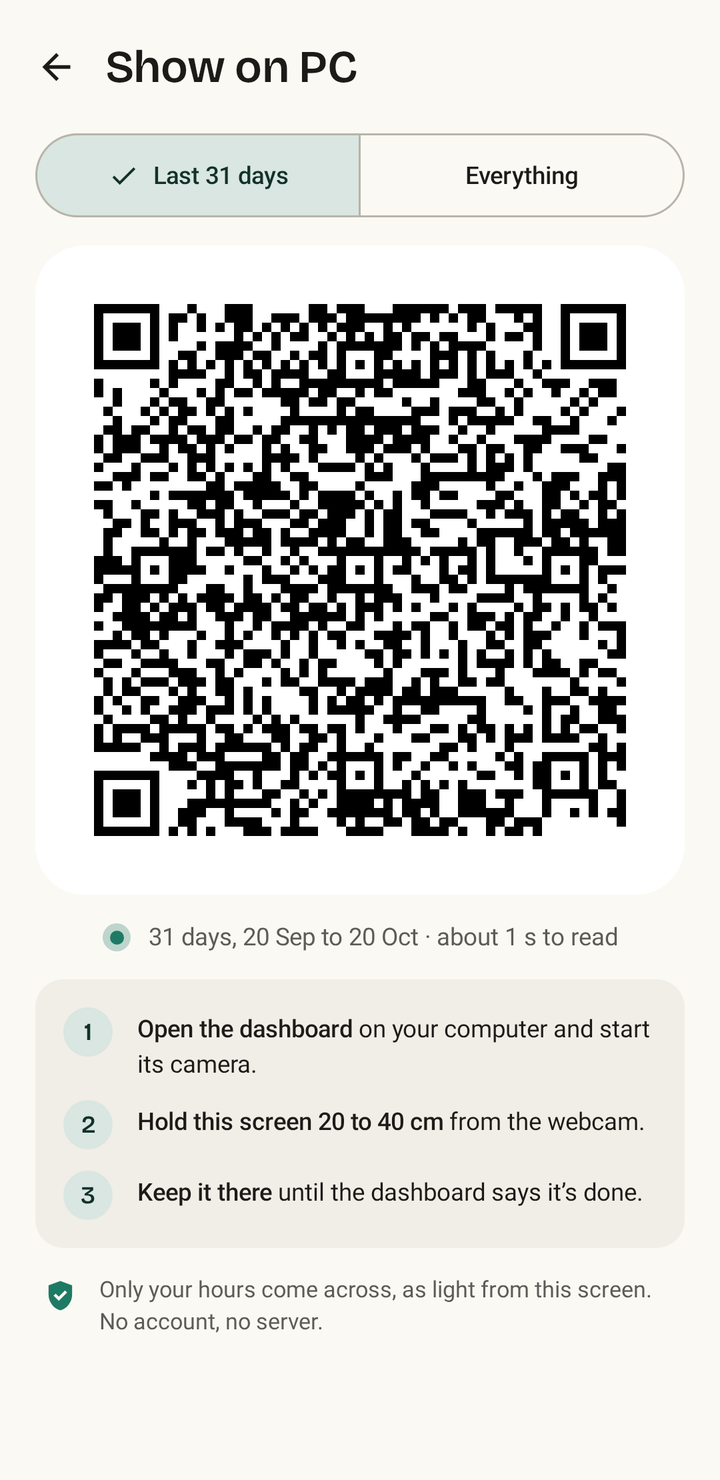
Open the dashboard, tap Show on PC and hold your phone up to the webcam. Your days hop across as a moving code: no account, no cloud, no cable. Then browse your weeks, months and year, or copy your hours straight into your timesheet.

About the dashboard Try it with sample days

Help shape Presence.

We're testing Presence with a small group whose weeks all look different: home every day, hybrid, on a big office campus, on shifts, with no fixed place, or always on the road. Sound like your week? We'd love to hear from you.

An Android phone with Android 9 or newer and Google Play services.
Join the pilot
Questions

Good to know.

More in Help
Can my employer see this?

No. Presence is just for you and your own hours. There's no manager view, no team dashboard and no productivity score.

Do I need an account?

No. Presence works without an account and without internet.

What if it gets a day wrong?

Fix it on your phone in a few taps: the start, the end or a missed break. Your change always wins, and Presence learns from it.

Is there an iPhone version?

Not at the moment. Presence is built for Android.